




What File Format is Needed for Logo Printing? (2026 Complete Guide)
Imagine that moment when you open a long-awaited box of promotional gifts only to discover that your company's logo on the products is blurry or has indistinct colours. This is a true nightmare for any marketing manager and entrepreneur, stemming from the same technical error in the preparation phase. We know that technical terms like vector graphics, raster, or DPI can cause considerable confusion and waste hours of valuable working time on unnecessary back-and-forth communication with the printing house.
Often, the main question is precisely what file format is needed for logo printing to ensure the final result is presentable, sharp, and professional on every material. In this 2026 complete guide, we will finally clarify the matter and give you the confidence you need. Logotrade's 21 years of experience in the market confirm that choosing the correct file is a foundation that saves both your time and your marketing budget.
You will learn exactly which file formats guarantee the best quality for promotional gifts and how to avoid costly printing errors even before sending the file. We will highlight specific file extensions to ask your designer for and explain how to check the logo's suitability yourself. This is your practical guide to high-quality promotional products that represent your brand with dignity and distinction.
Key Points
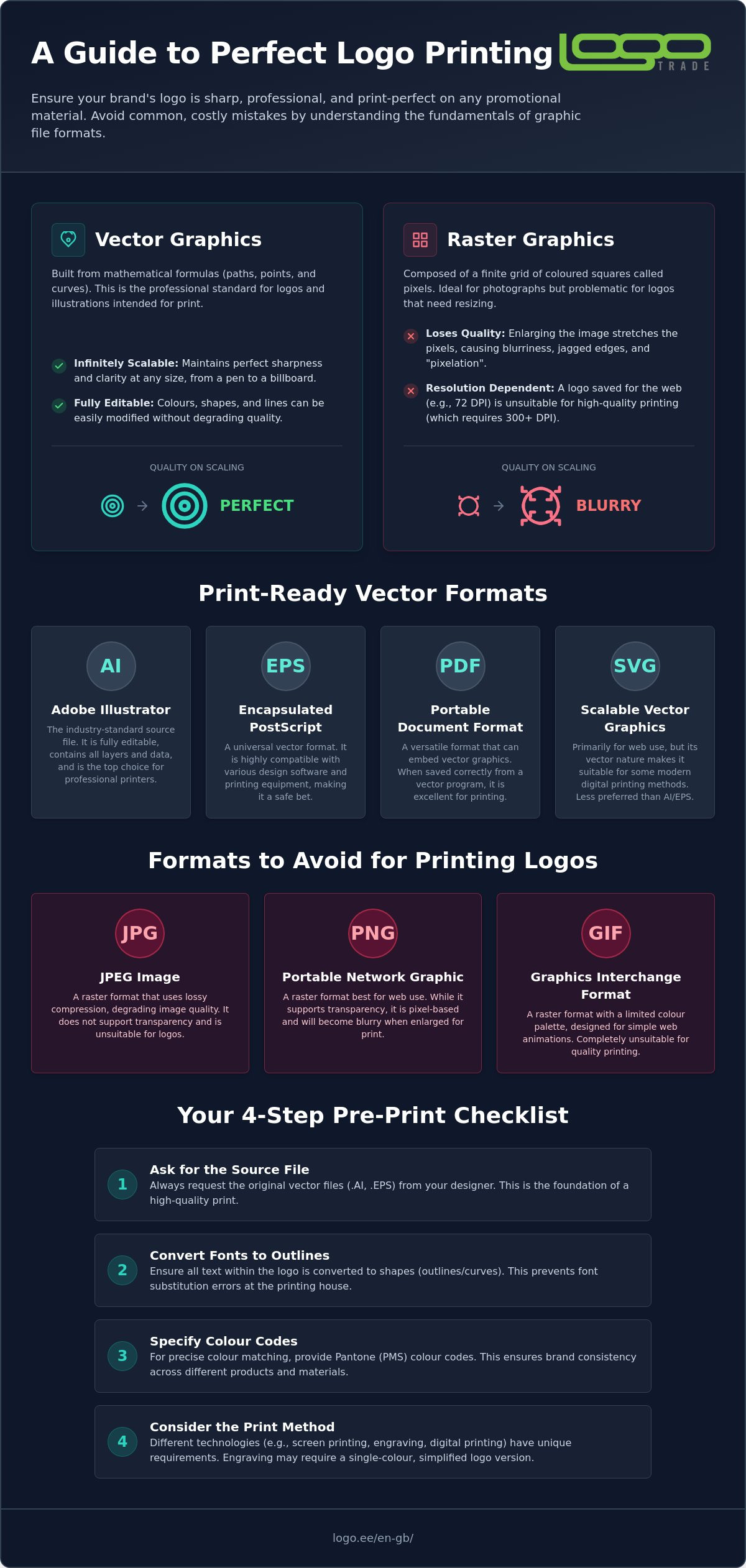
- Learn to distinguish vector graphics from raster graphics and discover why only vectors ensure perfect logo sharpness at any size.
- We will explain exactly, what file format is needed for logo printing, to avoid blurry results and save time communicating with the printing house.
- Discover why it is critical to convert fonts to outlines and which file extensions like .AI and .EPS are indispensable in the professional printing industry.
- Gain an overview of how different printing technologies, such as engraving or screen printing, impose their specific file requirements.
- Logotrade experts' advice will help you avoid costly mistakes and offer a solution even if you initially only have a low-quality image file.
Vector Graphics vs Raster Graphics: Why Your Logo "Pixelates"?
Let's start with the most important truth: not all image files are created equal. If you have ever tried to enlarge a small image saved from the web and ended up with jagged edges and indistinct colour patches, you have encountered the technical limitations of raster graphics. This is the point where many marketing projects get stuck, because a file that looks good on screen cannot withstand the critical eye of a printing press.
The question of what file format is needed for logo printing almost always comes down to a choice between a pixel and a mathematical point. Raster graphics, such as the well-known .JPG or .PNG, consist of thousands of tiny coloured squares, or pixels. These are perfectly suited for displaying photographs, but for logos, they are extremely risky when printing. If the image is enlarged, these squares physically stretch larger, and the logo loses its sharpness, becoming blurry.
A completely different world is Vector Graphics. This is not based on pixels, but on complex mathematical formulas that describe points, lines, and curves. Printing machines, whether a high-precision laser engraver or a large-format printer, require precisely these mathematical coordinates. A vector file is the industry standard for printing because it maintains quality on both a ballpoint pen and a giant outdoor advertisement. This is the only way to ensure that your brand's symbolism retains its authority on every surface.
Limitations of Raster Files for Promotional Gifts
The biggest mistake is to assume that a logo with 72 DPI (dots per inch) resolution taken from the web is suitable for professional printing. High-quality print work usually requires at least 300 DPI clarity. If a low-quality file is sent to the printing house, visual noise and blurriness will appear around the logo's outlines, spoiling the product's appearance. Even if your PNG file seemingly has a transparent background, this does not automatically make the image print-ready, because the number of pixels is still fixed and cannot be generated in high quality.
Advantages of Vector Graphics and Scalability
Vector files are incredibly flexible and future-proof. You can change the logo's colours in seconds to precisely match the material of a specific product or Pantone colour codes. Programmes like Adobe Illustrator and CorelDraw are indispensable tools used by professionals here. Logotrade's 21 years of experience show that many clients initially lack the correct vector file. In such cases, our own design team comes to the rescue, helping to vectorise the logo and prepare the print files. A vector file is often surprisingly small in size but contains all the information needed for endless scaling of the logo without any loss of quality.
Best File Formats for Printing: AI, EPS, and PDF In-depth Analysis
Once you have understood the nature of vector graphics, the next step is to know how to ask your designer for the correct file extension. The question of what file format is needed for logo printing finds its answer among four main extensions, each with its role in professional print preparation. The right choice ensures that your brand's visual identity does not become unrecognisable during the printing process.
.AI (Adobe Illustrator) is the undisputed king of the printing industry. It is the original file that retains all logo layers, colours, and lines in an editable form, allowing the designer to make quick corrections without sacrificing quality. .EPS, on the other hand, is a universal vector container. It is indispensable when a file needs to be opened on older machines or in different software without compatibility issues. If you want to delve into the details of file organisation, this comprehensive guide to logo file types explains the technical structure and best uses of these formats in even more detail.
.SVG has recently gained popularity mainly due to web design. Although it is in vector form and ideally suited for screens, it can also be used with certain concessions in modern digital printing. However, it is worth remembering that printing houses still prefer AI or EPS formats for stability and accuracy, as these are better optimised with printing machine software.
How to Recognise the Correct Vector File?
Many clients make the mistake of simply renaming a standard .jpg file to an .eps extension. This does not magically turn the image into a vector; it merely creates a faulty file that printing software cannot read. The easiest way to check a file is with the enlargement test. Open the file and zoom the logo to 800 per cent. If the edges are still pin-sharp and smooth, it is a pure vector. However, if you see jagged pixels or blurry edges, the file is unsuitable for printing. Professionals also check for the presence of layers and lines in specialised software to ensure a perfect print result on every material.
PDF File "Traps": Vector vs Raster
.PDF is probably the most deceptive format of all. Imagine a PDF as an envelope. Inside it, a high-quality vector design might be hidden, but equally, a low-resolution screenshot or an image copied from the web. For a PDF to be print-ready, it must have been saved from the original vector graphics programme with the correct settings. Always use "Press Quality" settings and ensure that all necessary fonts and colour profiles are embedded. If you are unsure whether your existing file meets the requirements, it is worth exploring our design services, where our experts will check and prepare your files. Proper preparation is an investment that prevents the creation of faulty products and ensures your brand shines on every promotional gift.
Printing Technologies and File Requirements: From Screen Printing to Engraving
Different printing technologies impose very specific file requirements. The answer to the question of what file format is needed for logo printing depends directly on the chosen printing method. Each technology has its own mechanics that determine how the machine reads the information in the file and transfers it to the product. This is a critical stage where the wrong file choice can mean wasted time and a poor-quality result.
Screen printing and pad printing are classic methods where a vector file is indispensable. In these cases, colours are separated into films and printing frames. Vector graphics allow the designer to cleanly separate each colour into its own layer without losing quality. Choosing the correct logo file format here ensures that the printed outlines remain pin-sharp and do not "bleed" at the edges. This is particularly important for small products, such as branded ballpoint pens, where every millimetre counts.
For engraving, the situation is even more demanding. The laser beam does not see coloured squares but follows vector paths. These are mathematical instructions that tell the device exactly where to remove material or burn a mark. For embroidery, however, digitisation takes place. The logo is converted into a sequence of stitches understandable by the embroidery machine. The cleaner the original vector file, the higher the quality and truer to life the final result will be on the textile. Digital printing offers more freedom and allows the use of high-quality raster, but for finer text and details, vector remains unsurpassed.
Colour Management: CMYK vs Pantone
Screens use the RGB colour space, which is based on light, but printing machines operate in the CMYK or Pantone (PMS) system. This is why a vibrant blue logo on screen might appear duller on the product. The Pantone system is indispensable if you want an identical colour shade on different materials. Logotrade experts always recommend adding specific Pantone colour codes directly to the vector file. This eliminates room for interpretation and ensures visual consistency of the brand regardless of the product.
Different Materials and Logo Legibility
The choice of material dictates the logo design. For example, on softer textiles, colour bleed is greater, so minimum line thicknesses must be larger than for metal engraving. For very detailed logos, there may be a need to simplify the logo so that small elements do not "run together" in print. Also, when preparing the file, it is necessary to consider whether the logo will be on a light or dark background. Positive and negative logo versions help maintain legibility in every situation. Explore our portfolio of completed works to see how we have achieved perfect legibility even on the most challenging surfaces.
5 Common Mistakes in Logo Preparation (and How to Avoid Them)
Even if you have found the answer to the question of what file format is needed for logo printing and sent us a seemingly correct .AI or .PDF file, technical minor details can spoil the final result. Print preparation is a precise science where even the smallest error in the file often means production downtime or a poor-quality promotional gift. Logotrade's 16 years of experience show that the vast majority of problems are preventable with just a few clicks before sending the file.
One of the most insidious mistakes is "hiding" low-resolution raster images in a PDF container. The fact that the file extension is .pdf does not magically turn a blurry, pixelated photo contained within it into a vector. In the printing process, such a logo will still be of poor quality and jagged. It is also necessary to avoid excessive effects such as shadows or complex transparencies. Although these appear captivating on screen, they cannot be correctly implemented in many techniques, such as screen printing or engraving. Furthermore, it is essential to ensure that the file is in the CMYK colour space; RGB colours are intended for screens and can appear considerably duller in print than expected.
Outlining Fonts (Create Outlines) – Why is it Critical?
Imagine a situation where the printing house opens your file, and instead of your stylish logo, there are arbitrary blocky letters. This happens when fonts have been left "unoutlined". This means that the text is in an editable form in the file, but the printing house's computer lacks that specific typeface. The solution is simple: in Adobe Illustrator, select the text and use the command "Create Outlines" (Ctrl+Shift+O). This converts the letters into mathematical lines that every computer and printing machine reads uniformly. This is an irreversible process, so always keep a working file with editable text in case you wish to modify the data later.
Bleed and Safe Zone
Printing is a physical process, and mechanical tolerances must always be taken into account. A 1-2 mm shift during printing is a completely normal phenomenon, which is why logo elements should never be too close to the edge of the product. If the logo is placed in the so-called safe zone, it is guaranteed that even with a small shift, the result will remain presentable and symmetrical. Logotrade's experienced designers review files for every order and assist in optimising the layout to avoid visual defects.
Do not let technical obstacles spoil your brand's image. If you are not entirely sure about your file's suitability, Logotrade's design services are specifically created to ensure your logo achieves perfect form on every product without any surprises.
Logotrade Pro Solutions: How to Ensure a Perfect Print Result?
A high-quality promotional gift begins with professional preparation. Logotrade has been operating in the market for over 21 years, offering comprehensive solutions that save clients' time and stress. We know precisely that a company may not always have an ideal vector file readily available, but this should not be an obstacle to achieving an outstanding result. Our team is here to transform technical complexity into a simple and smooth process.
If you are still troubled by the question of what file format is needed for logo printing, then we have an encouraging message for you: send us the file you have. Whether it's a .jpg, .png, or even a screenshot, our experienced designers will review it immediately. Our dedicated design services department specialises in vectorising logos and preparing print files, ensuring that the final result is pin-sharp even on the most demanding materials.
Our Design Process and Quality Control
Every order undergoes thorough quality control at Logotrade. Our experts do not merely open the file; we analyse the logo's details, line thicknesses, and colour suitability with the chosen printing technology. We consult with you and recommend the best solution, whether it's screen printing, engraving, or embroidery. Our goal is for your brand to shine and endure. View our completed works and verify the quality on our portfolio page.
Before the printing machines are started, we always send you a free visual proof for approval. This is your assurance that the logo's position, size, and colours are exactly as you expected. This stage eliminates any surprises and ensures that you receive products you can be proud of.
Ordering is Simple and Secure
With us, you do not need to be a graphic design expert. It is enough to select suitable Branded Promotional Gifts and provide us with your branding. Our specialists will give an immediate response regarding the file's suitability and, if necessary, offer solutions for its improvement. This is a convenient full service focused on results, not technical disputes.
For a more personal experience, you are always welcome to our customer support office in Tallinn. We are located at Pärnu mnt 160 A, where you can see various samples and the results of different printing technologies with your own eyes. It is easier to discuss more complex projects on-site and find solutions that match your budget and needs. Contact us today and let's create promotional products together that work for your company's successful future!
MAKE YOUR BRAND SHINE WITH QUALITY
The correct print file is an investment in your company's credibility and visual authority. We have clarified why vector graphics are the cornerstone of a professional result and how to avoid errors related to fonts and colour spaces. Now that you know exactly what file format is needed for logo printing, the path to presentable and high-quality promotional gifts is open. Do not let technical minor details spoil your brand's image; choose certainty and clarity.
Logotrade's 21 years of experience and Estonia's largest selection of business gifts are at your service to turn every marketing idea into a success. We offer professional design assistance and vectorisation, ensuring that your branding remains pin-sharp on every material. We are your stable partner, taking care of technical precision so that you can focus on growing your business.
Choose suitable promotional gifts and request a quote here!
Let's start collaborating today and together create advertising solutions that will be remembered and convey your message with dignity!
Frequently Asked Questions
Is a .PNG file suitable for logo printing?
Generally, a .PNG file is not suitable for professional printing, as it is raster graphics, which loses its sharpness when enlarged. PNG is specifically designed for web use and only supports the RGB colour space, which means the print result may be blurry and the colour tones inaccurate. To achieve the best print quality on promotional products, vector graphics should always be preferred, as this ensures clean outlines regardless of the product's size.
What does outlining text mean?
Outlining text means converting typefaces into mathematical lines and curves. This is a critical step to ensure the printing house can open the file correctly without needing the font file present on your computer. If the text is not outlined, the typeface may be replaced by an arbitrary substitute font during the printing process, which completely ruins the logo's visual identity. This simple action in a graphics programme prevents costly errors and production delays.
Why does the printing house ask me for Pantone codes?
Pantone (PMS) codes are necessary to ensure the precise and identical representation of your brand's colours on different materials. As standard printing ink can vary on different surfaces and in different printing machines, the Pantone system acts as an international standard that specifies a particular colour mix. This prevents situations where your logo appears in completely different shades on a ballpoint pen, a plastic bag, and a T-shirt, maintaining a professional and consistent brand image.
I only have a small .JPG file, can it be made into a print-ready file?
A small .JPG file cannot directly be turned into a high-quality print file, but it can be professionally vectorised. This means that Logotrade's designers will redraw your logo manually or using specialised software into a vector format. This is the only way to make a low-quality image suitable if it turns out that this is precisely what file format is needed for logo printing within the scope of your specific project.
Can I convert a raster file to a vector file myself?
Converting a raster file to a vector file requires specialised graphics software like Adobe Illustrator, not just manually renaming the file extension. Although automatic online tools exist, their results are often inaccurate, jagged, and unsuitable for printing. To achieve a high-quality and clean result, we recommend using Logotrade's design team, who will redraw your logo manually, ensuring perfect line clarity and technical correctness for any print job.
What is the difference between CMYK and RGB colours?
The main difference is that RGB is intended for screens and CMYK for printing machines. The RGB colour space is based on light and is considerably wider, capable of displaying more vibrant shades that cannot always be achieved with printing inks. Therefore, print files must always be prepared in CMYK mode to avoid disappointing colour shifts on the finished product. Logotrade experts will help you convert the colours to the correct mode.
Is a PDF file always a vector file?
A PDF file is not automatically a vector file, but rather a container that can hold both vectors and low-resolution raster images. If you save a low-quality image in PDF format, it will still remain a blurry pixel image unsuitable for professional printing. For a PDF to be print-ready, it must have been originally created in a vector graphics programme and saved with the correct print settings that preserve the mathematical lines and points.
Which file format is best for embroidery?
For creating an embroidery programme, the best base file is a clean vector file, such as .AI, .EPS, or a vector .PDF. Although the embroidery machine itself uses specific stitch-defining formats, these programmes are created based on vector graphics. The clearer and more precise the logo's outlines are in the original vector file, the more true-to-life and higher quality the embroidery result will be on your corporate textile. This is the only way to ensure the legibility of fine details and lettering.